

Authentication
All API requests require a Bearer token in theAuthorization header. API keys use the brz_ prefix.
read (GET requests only) or write (GET, POST, and PATCH). Calls to write endpoints with a read-only key return 403 FORBIDDEN.
The API has no DELETE requests. Actions that remove something are POST endpoints that need write access, for example voiding or discarding a journal, unpublishing an invoice, or unsyncing transactions from Xero or QuickBooks. Deleting transactions, wallets, contacts, or rules stays in the Breezing dashboard.
Creating an API Key
API keys are managed at the user level. A single key can span multiple companies with specificread or write access per company.
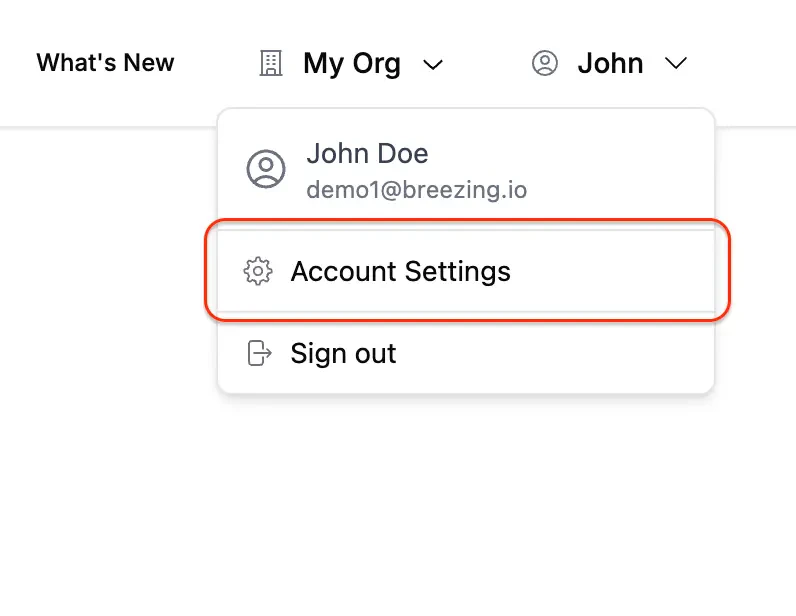
To create one, open the profile menu in the top-right corner and select Account Settings:
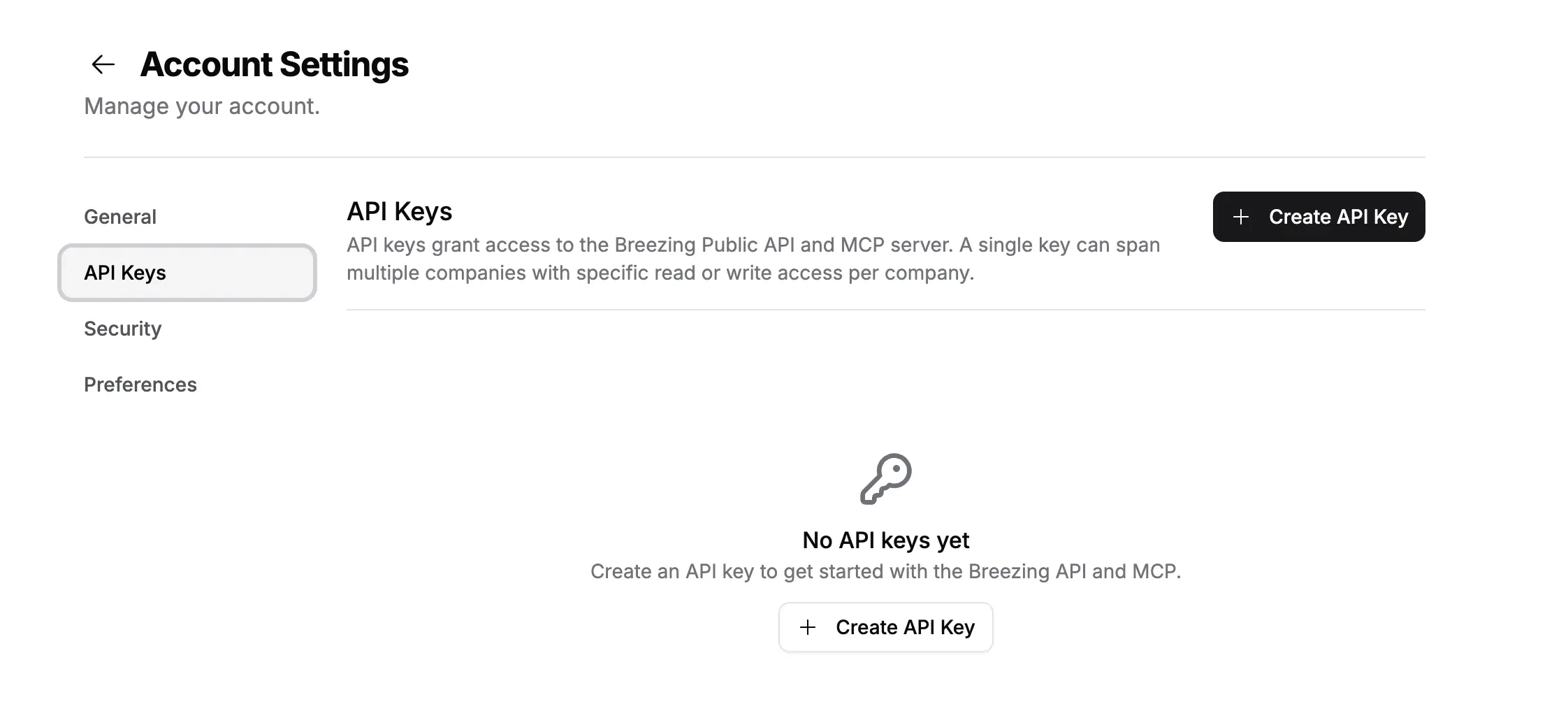
brz_ prefixed key as a Bearer token in all API requests.
Base URL
All endpoints are served from:Finding orgId and companyId
Every endpoint exceptGET /companies requires orgId and companyId as query parameters. Start by calling GET /companies to list every company your API key can access. Each entry returns its id, orgId, and accessLevel.
orgId or companyId, or using IDs your API key isn’t assigned to, return 400 BAD_REQUEST or 403 FORBIDDEN.
Rate Limits
The Breezing API currently allows up to600 requests per minute per API key. If you hit the limit, back off briefly and retry your request.
Pagination
GET /transactions, GET /assets, GET /contacts, GET /reports, and GET /rules use cursor-based pagination:
cursor: the ID of the last item from the previous page (omit for the first page)limit: number of items to return per page (1 to 100)
pagination object:
pagination.limit: number of records requestedpagination.cursor: the cursor value for the current page, ornullpagination.hasMore: whether another page of results is available
GET /invoices, GET /sales-invoices, GET /journals, GET /taxes, and GET /vat-report/transactions use offset-based pagination instead:
limit: number of rows per page (1 to 200, default 50)offset: number of rows to skip (default 0)
pagination object returns limit, offset, total, and hasMore.
GET /reports/{id}/ledger pages with its own cursor. Pass the nextCursor from the previous page back unchanged until the response reads complete: true.
Long-Running Operations
Many write endpoints start a background job and answer before the work is done. Each job is a row inGET /tasks, and most of these endpoints return its taskId in the response.
Five of them start a job without returning a
taskId: POST /wallets/{id}/sync, POST /balances/calculate, POST /ngl/calculate, POST /active-issues/refresh, and POST /journals/{id}/attachments. Find their job in the GET /tasks list. PATCH /company also starts a job when you send lockTransactions: true, and returns it as lockTaskId.
Following a task. Call GET /tasks?id=<taskId>. A lookup by id returns the task whatever its status, so a finished task reads done instead of dropping out of the list. The statuses are pending, progress, paused, error, completedWithWarning (finished, with the skipped items named in error), ready (an export whose download link is in metadata.link), limitExceeded (stopped at the plan usage limit), and done. The plain GET /tasks list leaves done tasks out.
Duplicate runs. While a job is running for the same company or wallet, starting the same job again returns 409 with a TASK_IN_PROGRESS code. Check GET /tasks before starting a new run, and again before reading derived data such as balances or reports, since overlapping runs can corrupt computed state. The exceptions:
POST /walletsalways succeeds, since each call targets a new wallet.POST /wallets/{id}/syncreturns409 CONFLICTon a balance tracking wallet while a tracking walk is running, andPOST /wallets/{id}/integrity-checkreturns409 CONFLICTwhile a check is running for that wallet.- The report endpoints allow parallel creation, so they skip the guard. Poll
GET /tasksorGET /reports/{id}until the report leavespending/progress, and avoid sending the same parameters again while one is pending.POST /reports/{id}/regeneratereturns409only while that report is still generating. POST /transactions/export-journals,POST /invoices, andPOST /invoices/{id}/rescanhave no guard either.
POST /xero/sync and POST /qbo/sync answer 202 with a taskId as soon as the sync is queued. Queued is not synced: the outcome is on the task, which ends as done, completedWithWarning (with the transactions that could not be synced and why), or error. Syncs for one company never overlap. A sync started while another one is running, from the API or the dashboard, waits its turn. Both endpoints return 409 TASK_IN_PROGRESS only while a find duplicates scan is unfinished, and 503 SERVICE_UNAVAILABLE if the task could not be queued, in which case you send the request again.
POST /bexio/sync still runs synchronously and responds once Bexio has accepted the batch. It returns 409 TASK_IN_PROGRESS while a dashboard batch sync is running for the company.
File Uploads
Invoice files, transaction attachments, and journal attachments all upload the same way:- Request a signed upload link:
POST /invoices/upload-links,POST /transactions/{id}/attachments/upload-link, orPOST /journals/{id}/attachment-links. - Send the file bytes with an HTTP
PUTto the returned URL, with every header inrequiredHeadersexactly as returned. Do not send your API key on this request. - Register the upload with its
storagePath:POST /invoices,POST /transactions/{id}/attachments, orPOST /journals/{id}/attachments.
429 with the reason.
Error Responses
Errors returnsuccess: false and an error object with code and message:
Resources
Companies
List the companies your API key can access. Start here to find org and company IDs.
Company
Retrieve a company’s accounting configuration, or update its settings: cost-basis method, default accounts, books lock date, and financial year end.
Chart of Accounts
List the chart of accounts with each account’s statement classification, and add or edit accounts without an accounting integration.
Transactions
Create, list, count, and update crypto transactions by ID or by filter. Group internal transfers and trades, consolidate, reprice, lock or unlock, export journals as CSV, and manage attachments.
Wallets
View, create, update, and sync wallets and exchange accounts, run integrity checks, and track balance verification.
Assets
Browse token assets and manage their GL account mappings.
Balances
Get aggregated token balances across wallets with fiat valuations.
Contacts
Label counterparty addresses with names, and group them under vendor entities that carry default invoice coding.
Active Issues
Surface uncategorized transactions, missing prices, and broken syncs blocking the close.
Reports
Generate token, account, and explorer balance reports. Read an account report as a trial balance, Profit and Loss, Balance Sheet, cash flow statement, general ledger, or aged payables and receivables.
Rules
Manage automation rules that auto-categorize transactions based on conditions.
Tasks
Track background tasks like wallet syncs, report generation, and accounting syncs, or look one up by ID.
Gain/Loss
Recompute realized and unrealized net gain or loss across crypto transactions.
Invoices
Upload and scan vendor invoices, review and approve them, match the transactions that paid them, and publish them as bills to Xero or QuickBooks.
Issued Invoices
Create and update the invoices you send to customers, and link the incoming payments that settle them.
Journals
Create, post, update, void, and discard manual journals for accruals and corrections, with supporting files attached.
Tax Rates
Manage the tax rate catalog that transactions, invoices, and rules reference by name.
VAT Report
Read output and input VAT per tax rate for a period, with the transactions and documents behind each figure.
Record History
See who changed a contact, asset, rule, tax rate, invoice, or journal, and what the values were before.
Xero
Refresh Xero accounts, categories, and invoices, create or update an account, book invoice payments and gain/loss journals, sync or unsync transactions, remove duplicate journals, and attach files to a journal.
QuickBooks
Refresh QuickBooks accounts, classes, and entities, create or update an account, sync or unsync transactions, and remove duplicate journal entries.
Bexio
Refresh Bexio accounts and sync crypto transactions as journal entries.